

2 2月 2026
GeoWizard のご紹介
あらゆる座標に安心と信頼を
Spatial data only becomes useful when it lines up with the real world. In practice, that alignment is where many CAD workflows start to break down. Drawings arrive in different coordinate systems, survey data is supplied in unfamiliar formats, and imagery is added by eye rather than by reference. Each workaround adds risk, and small positional errors can quietly carry through an entire project.
GeoWizard は、こうした日常的に発生する空間データの課題に対処するため、設計作業が実際に行われる CAD 環境内での利用を前提として開発されました。座標系を管理するために複数のソフトウェア間でデータを行き来させるのではなく、その制御を AutoCAD や BricsCAD の中に保ちます。
At its core, GeoWizard connects drawing geometry to real-world reference systems. Existing designs can be repositioned into the correct datum without redrawing or rebuilding models. Survey coordinate lists can be brought in and turned into usable CAD objects with their spatial meaning intact. Height information and time-dependent coordinate considerations can be handled as part of the same workflow, rather than as separate technical exercises.
視覚情報もまた、空間データとして扱われます。画像は手動の拡大縮小ではなく座標に基づいて挿入されるため、単なる背景ではなく信頼できる参照情報として活用できます。
GeoWizard is not about adding more layers of complexity. It is about giving designers, surveyors and engineers a practical way to keep their drawings aligned with the coordinate systems that define the real world. By keeping these controls inside the drafting environment, spatial accuracy becomes part of the normal design process instead of a separate specialist task.
Transform drawings between coordinate
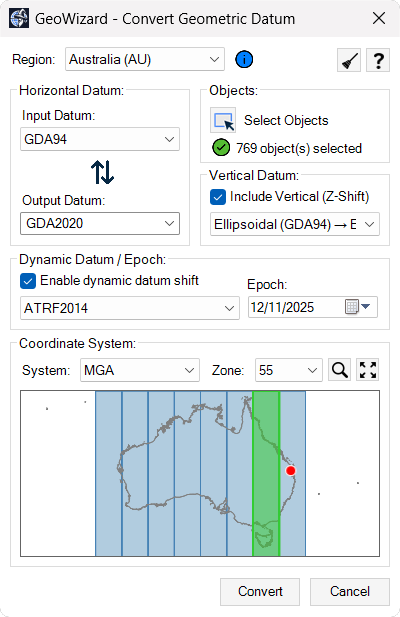
systems: Convert existing CAD geometry from one datum or coordinate reference system to another using authoritative transformation models, keeping design data aligned with real-world survey control without leaving your CAD environment.Import survey coordinate data into CAD: Bring in coordinate lists from common ASCII formats and convert them into correctly positioned points or linework in model space by defining the source coordinate system before import.
Manage vertical and epoch-based coordinates:
Work with elevation reference systems and time-dependent coordinate frames so height values and positional data remain consistent across datasets captured at different times.ジオリファレンス画像の挿入 実世界の座標に基づいて衛星画像や航空写真を図面に追加し、測量データや設計ジオメトリと視覚情報を正確に整合させます。
世界各地の座標系に対応 異なる国や地域で使用される座標参照系を単一のワークフロー内で扱うことができ、複数の基準を含むプロジェクトにも対応します。
座標変換、測量データの統合、そして地理空間コンテキストを CAD 環境内に取り込むことで、GeoWizard は図面を実世界の基準系に正確に整合させ、安心してプロジェクトを進められる成果物の作成を支援します。