Confidence in every coordinate.

COORDINATE TRANSFORMATION TOOLS.

Work with multiple coordinate systems directly inside AutoCAD and BricsCAD

GeoWizard enables you to transform existing CAD geometry between coordinate reference systems directly within model space. Official grid-based transformation models are applied within the correct geodetic context, allowing drawings created in legacy datums to be aligned accurately with modern spatial reference frameworks.

This removes the need for exporting data to external GIS or survey software just to perform coordinate conversions. Your design geometry remains intact while its spatial reference is updated in a controlled and traceable manner.

GeoWizard supports multi-step transformation paths where required, ensuring that even historic or region-specific datums can be reliably brought into current project coordinate systems. This keeps survey data, design models and project deliverables spatially consistent throughout the workflow.

Ribbon bar and command support included for ease of use.

SURVEY DATA IMPORT.

Bring external coordinate data directly into your drawing environment

GeoWizard allows coordinate-based survey data from common ASCII formats to be imported directly into model space as CAD geometry. Users can define the coordinate system of the source file before import, ensuring that incoming data is correctly positioned within the drawing’s spatial reference framework.

This removes the need to process survey files through separate GIS or office software just to prepare them for CAD use. Coordinate lists from field surveys, control mark databases or consultant datasets can be converted into points, linework or other objects in a single, controlled workflow.

Field-to-design data transfer becomes more reliable, with coordinate integrity maintained from the original source through to the working drawing. GeoWizard helps teams integrate survey information quickly while reducing the risk of misalignment caused by incorrect assumptions about coordinate systems.

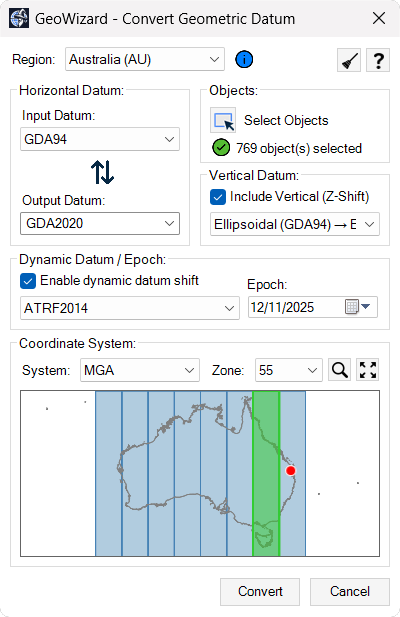
GeoWizard_ConvertGeometricDatum
VERTICAL AND EPOCH SUPPORT.

Maintain consistency in height systems and time-dependent coordinates

GeoWizard supports workflows where both vertical reference systems and coordinate epochs must be considered. Height values can be managed in the correct vertical context, helping ensure that elevation data remains consistent between survey inputs, design models and construction deliverables.

Where coordinate systems are tied to specific reference epochs, GeoWizard allows these to be handled as part of the spatial workflow. This is important in regions where modern datums account for tectonic motion or time-dependent reference frames, and where positional values can vary depending on the epoch of the data.

By keeping vertical and epoch-related considerations integrated with horizontal transformations, GeoWizard helps maintain spatial consistency across datasets captured at different times or under different reference conditions. This reduces the risk of subtle but significant positional differences that can affect engineering and survey outcomes.

GEOREFERENCED IMAGE INSERTION

Add spatially aligned imagery directly into your drawing

GeoWizard enables users to insert satellite or aerial imagery into model space so it aligns correctly with the active coordinate system. The image is positioned using real-world coordinates, ensuring it provides accurate visual context for design, drafting and review tasks.

This allows project teams to work with up-to-date site imagery without relying on live map services or external reference files. Once inserted, the image remains correctly located within the drawing and travels with the DWG when shared across teams, offices or organisations.

By keeping imagery tied to the drawing’s spatial reference, GeoWizard helps maintain visual consistency between survey data, design geometry and real-world conditions, supporting clearer communication and more informed decision-making.

GLOBAL COORDINATE SUPPORT

Work confidently with coordinate systems from around the world

GeoWizard includes support for coordinate reference systems used across multiple countries and regions, enabling consistent handling of international project data within a single CAD environment. Regional profiles align with locally used systems, datums and terminology, helping users apply the correct spatial references without needing separate tools for different parts of the world.

Ready to get started?

Access infrADAC today and streamline the creation, validation, and delivery of ADAC XML files.