

2 February 2026
Introducing GeoWizard:
Confidence in every coordinate.
Spatial data only becomes useful when it lines up with the real world. In practice, that alignment is where many CAD workflows start to break down. Drawings arrive in different coordinate systems, survey data is supplied in unfamiliar formats, and imagery is added by eye rather than by reference. Each workaround adds risk, and small positional errors can quietly carry through an entire project.
GeoWizard was built to deal with these everyday spatial challenges inside the CAD environment where design work actually happens. Instead of shifting data between multiple programs just to manage coordinate systems, GeoWizard keeps that control within AutoCAD and BricsCAD.
At its core, GeoWizard connects drawing geometry to real-world reference systems. Existing designs can be repositioned into the correct datum without redrawing or rebuilding models. Survey coordinate lists can be brought in and turned into usable CAD objects with their spatial meaning intact. Height information and time-dependent coordinate considerations can be handled as part of the same workflow, rather than as separate technical exercises.
Visual context is also treated as spatial data. Imagery is inserted using coordinates, not manual scaling, so it becomes a reliable reference rather than just a background picture.
GeoWizard is not about adding more layers of complexity. It is about giving designers, surveyors and engineers a practical way to keep their drawings aligned with the coordinate systems that define the real world. By keeping these controls inside the drafting environment, spatial accuracy becomes part of the normal design process instead of a separate specialist task.
Transform drawings between coordinate
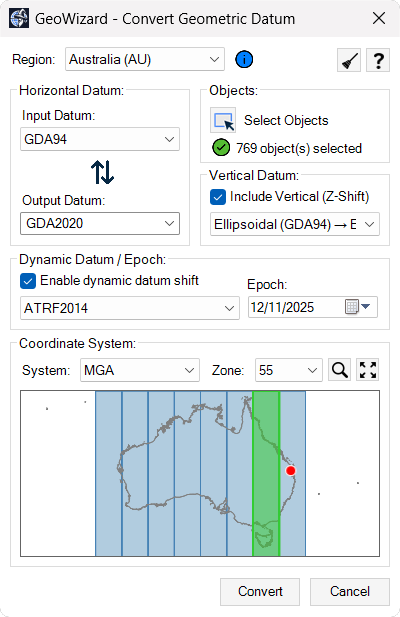
systems: Convert existing CAD geometry from one datum or coordinate reference system to another using authoritative transformation models, keeping design data aligned with real-world survey control without leaving your CAD environment.Import survey coordinate data into CAD: Bring in coordinate lists from common ASCII formats and convert them into correctly positioned points or linework in model space by defining the source coordinate system before import.
Manage vertical and epoch-based coordinates:
Work with elevation reference systems and time-dependent coordinate frames so height values and positional data remain consistent across datasets captured at different times.Insert georeferenced imagery: Add satellite or aerial imagery to drawings using real-world coordinates so visual context aligns accurately with survey data and design geometry.
Work with global coordinate systems: Handle coordinate reference systems used in different countries and regions within a single workflow, supporting projects that combine spatial data from multiple standards.
By bringing coordinate transformations, survey data integration and geospatial context into the CAD environment, GeoWizard helps teams deliver drawings that are spatially accurate, aligned with real-world reference systems and ready for confident project delivery.